Short answer: an IPTV player app is like a web browser for TV. It doesn't include any channels: you sign in with the details from your IPTV subscription, and it shows the channels, the TV guide and the movies. IPTV Smarters works almost everywhere, TiviMate is a favourite on Fire TV and Android TV, and VLC is a simple free option for M3U links.
When you start with IPTV, the vocabulary can be confusing: player, playlist, M3U, Xtream Codes, EPG. This guide explains each term in plain language and compares the most popular apps, so you can pick the right one for your device.
What a player app does
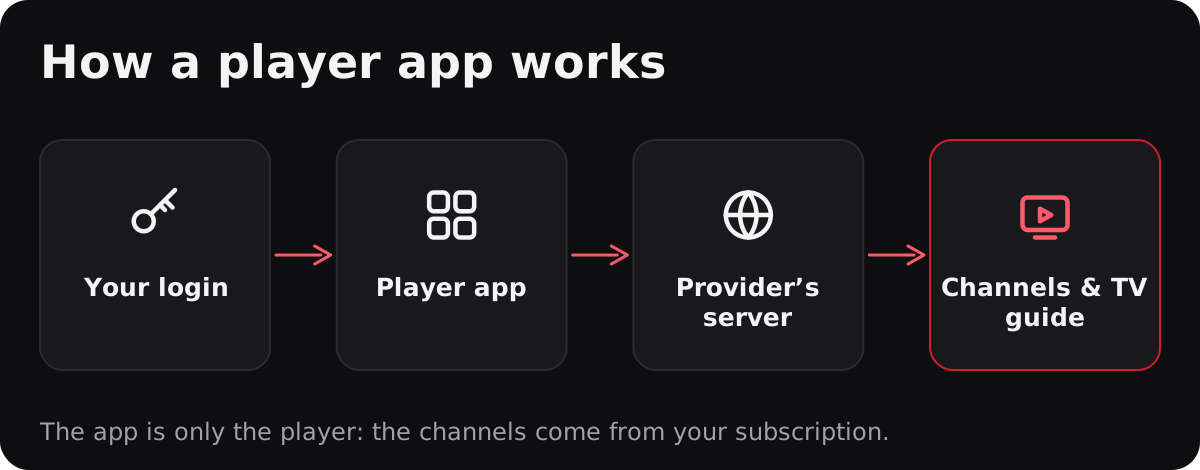
Think of it this way: your IPTV subscription is the service, and the player app is the screen you watch it through. When you sign in, the app asks your provider's server for the list of channels, the TV guide and the on-demand library, then plays the stream you choose. That's why the same subscription works in different apps, and why changing apps doesn't change your channels.
Be careful with apps or boxes sold “with channels included”. A legitimate player never comes with channels: you add your own subscription.
Xtream Codes or M3U link?
Providers give you your access in one of two formats. Most apps accept both.
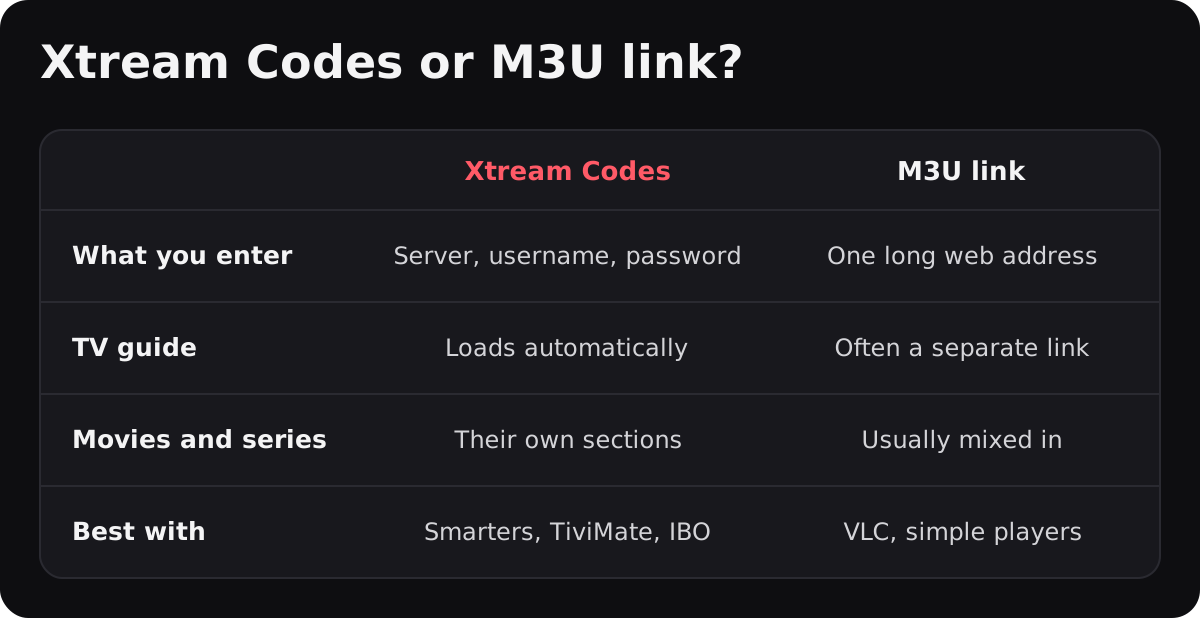
- Xtream Codes: three details, the server address, your username and your password. The app loads live TV, the TV guide (EPG), movies and series in separate sections. Recommended in IPTV Smarters, TiviMate and IBO Player.
- M3U link: one long web address that contains the whole channel list. It works in almost every player, including VLC, but the TV guide often needs a separate link, called an EPG or XMLTV link.
If your app asks for a format that isn’t in your welcome email, message us on WhatsApp and we’ll send it.
The most popular apps compared
IPTV Smarters Pro
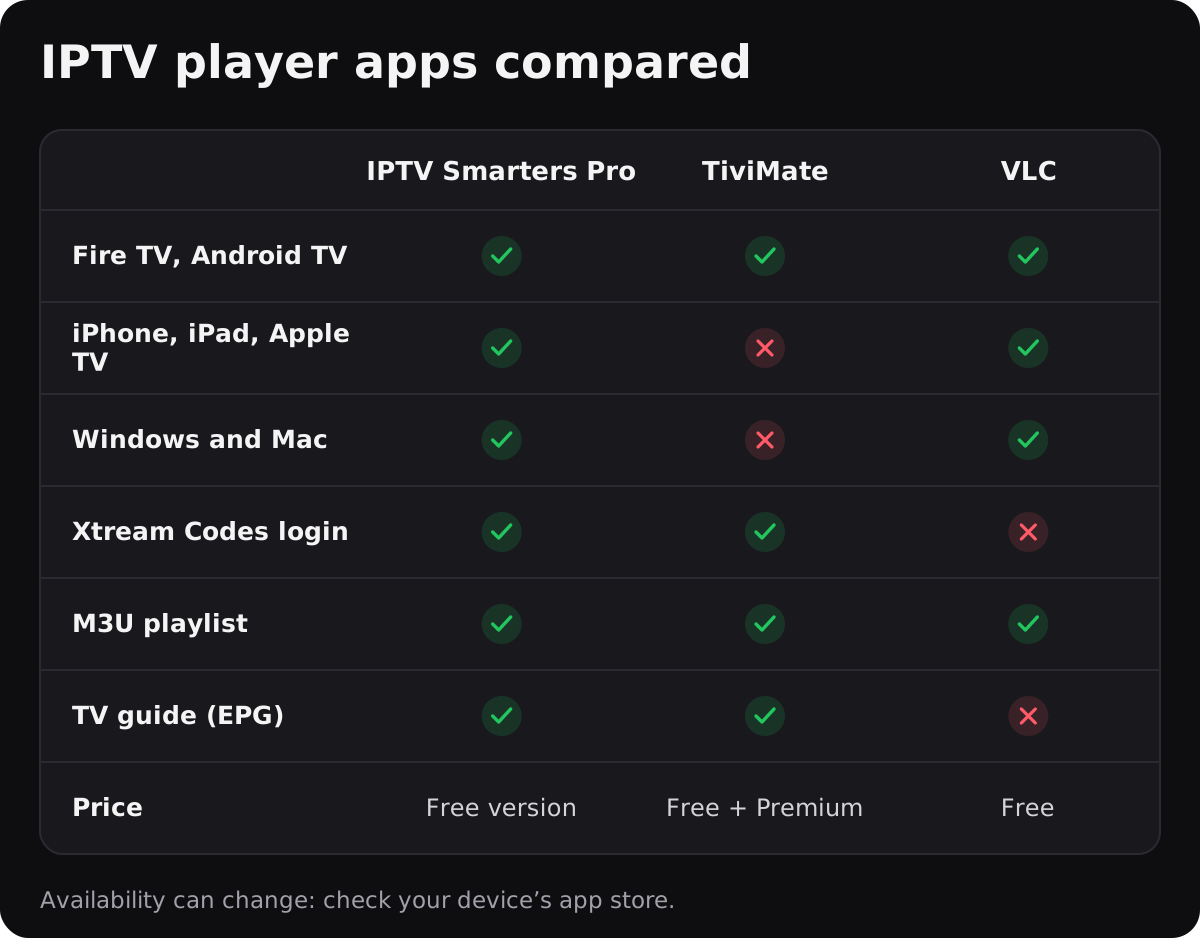
The all-rounder. It runs on Fire TV, Android TV, phones, tablets, Apple TV and computers, supports both Xtream Codes and M3U, and shows live TV, the TV guide, movies and series in a simple layout. A good first choice if you're new to IPTV or want the same app on every device.
TiviMate
Made for Android TV and Fire TV, TiviMate looks and feels like a cable box, with a full-screen TV guide and fast channel switching. The free version covers the basics; a paid Premium subscription from the app maker unlocks extras such as favourites management and recording. It isn't available on Apple devices or Smart TVs like Samsung and LG.
VLC
The free, open-source media player you may already know from your computer. It plays M3U links on almost every device, but it has no TV guide and no Xtream Codes login. Great for a quick test or as a backup, less comfortable for everyday TV.
IBO Player (Samsung and LG Smart TVs)
On Samsung (Tizen) and LG (webOS) Smart TVs, where most of the apps above aren't available, players such as IBO Player are installed from the TV's own app store. The app shows a MAC address and a device key that you use to add your playlist. Some of these Smart TV players charge their own activation fee after a free period: ask us before paying, we'll tell you what you need.
Which app should you choose?
- Fire TV Stick or Android TV box: IPTV Smarters to start, or TiviMate if you want a cable-like guide. See our Fire TV Stick guide.
- Samsung or LG Smart TV: IBO Player or a similar app from the TV's app store.
- iPhone, iPad or Apple TV: IPTV Smarters.
- Windows or Mac: IPTV Smarters, or VLC with your M3U link.
Step-by-step instructions for each device are in our setup guides. And if the picture freezes, whatever the app, our guide to fixing IPTV buffering will help.
Are IPTV player apps legal?
Yes. Player apps such as IPTV Smarters, TiviMate and VLC are legal: they only play the streams you sign in to. What matters is the service you connect them to. We explain the details in Is IPTV legal in Canada?.
Frequently asked questions
Is IPTV Smarters free?
IPTV Smarters Pro has a free version that covers live TV, the TV guide, movies and series. It doesn't include any channels: you sign in with your own IPTV subscription.
What's the difference between IPTV Smarters and TiviMate?
IPTV Smarters runs on almost every device and is easy to start with. TiviMate runs only on Android TV and Fire TV, with a cable-like TV guide; some of its features need a paid Premium subscription.
What is an M3U link?
An M3U link is a web address that contains your full channel list. You paste it into a player app such as VLC, IPTV Smarters or TiviMate to load your channels.
What is Xtream Codes?
Xtream Codes is a login format with three details: a server address, a username and a password. Most player apps support it, and it loads the TV guide, movies and series automatically.
Can I use the same subscription in several apps?
Yes. Your subscription works in any compatible app. Just stay within the number of screens your plan allows at the same time.
Does the app include channels?
No. A player app is only the player. The channels, TV guide and on-demand library come from your IPTV subscription.
Want to try a player with real content? Get your free month on WhatsApp, and we'll help you set up the app that fits your device.